
01 · OUR MISSION
Simplify Complex Study Delivery
Simplify complex grid connection study delivery by connecting study configuration, desktop-based simulation, results assessment, and reporting within a consistent project workflow.
Accelerate and simplify your grid connection studies with Gridovate, a platform purpose-built for developers, consultants, and utilities. From simulation to compliance, manage complex energy projects with clarity, speed, and precision.
Gridovate’s vision is to make grid connection projects—from straightforward studies to complex, multi-stage programs—easier to configure, execute, assess, and deliver through structured workflows, coordinated simulation tools, and engineering-focused automation.
Simplify complex grid connection study delivery by connecting study configuration, desktop-based simulation, results assessment, and reporting within a consistent project workflow.
Help engineering teams move confidently from project requirements and study cases to structured outputs while retaining control of local software, licensed environments, project models, and engineering decisions.
Real analysis outputs from completed Gridovate dynamics studies on PSCAD, PSS/E and PowerFactory. Pick a view to explore it.
Each project follows the same path: set up the project, choose a study module, set up the models for PSS/E, PSCAD and PowerFactory, define the simulation tasks and analysis criteria, then follow the run live.
Dynamics Studies · WECC_Hybrid_1PPC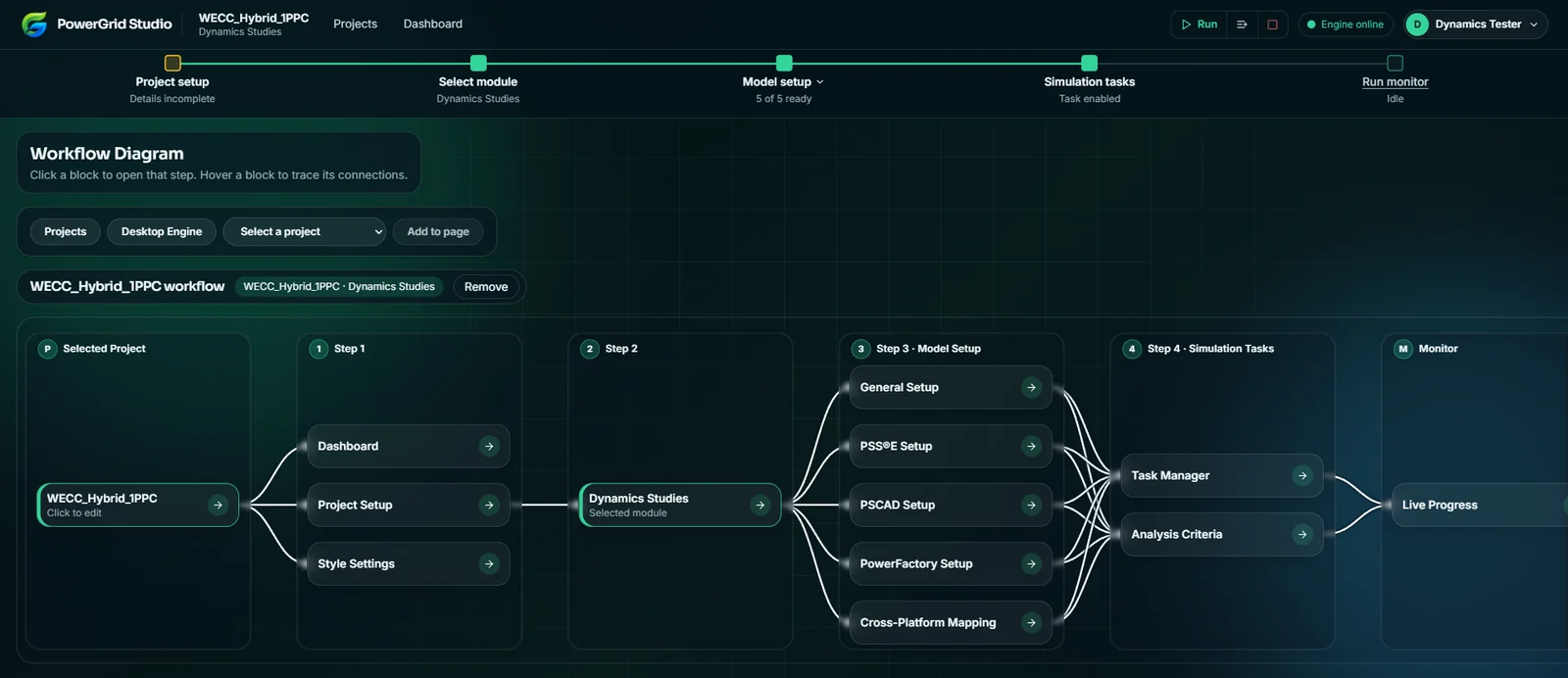
PQ and VQ capability, WAN steady-state and dynamics, fault ride-through, model aggregation, grid code templates and multi-engine queues, all in one workflow.
Gridovate delivers study modules for the main technical stages of a grid connection, from plant capability and model preparation to network-wide steady-state and dynamic assessment. Every module runs in the same project workflow: set up in the web app, execute on your desktop engine, review results and reports.
The first question from any utility is where the models live. Here is the answer.
Your network and plant models are read from, and results are written to, folders on the PC that runs the Desktop Engine.
Gridovate drives the PSS/E, PowerFactory, PSCAD and SINCAL the user already licenses. We do not supply or host the simulators.
The web app holds study configuration, task lists and run status so your team can plan, queue and review together.
Gridovate brings study preparation, simulation execution, results assessment, plotting, and reporting together in one controlled workflow.
Define the project, model configuration, and study requirements.
Gridovate supports the teams that configure, execute, review, and document complex grid connection studies.

Accelerate the full grid connection study cycle, from site selection and initial feasibility through tuning, compliance, and approval, across solar, wind, battery, hydrogen, data centres, and more, with a structured and consistent workflow.

Deliver grid connection studies efficiently across multiple clients and projects, with consistent workflows, integrated simulation tools, structured reporting outputs, and built-in team collaboration.

Evaluate connection applications efficiently with tools built for grid connection studies, grid code validation, due diligence, streamlined technical reviews, and consistent technical reporting.

Review structured study configurations, simulation evidence, engineering assessments, and report-ready outputs for technical due diligence and grid connection decisions.
Gridovate provides the architecture, control, and traceability needed to manage grid connection projects consistently across teams, tools, and execution environments.
Configure and monitor studies through the web platform while licensed software, project models, and execution remain on connected desktop engines.
Create, customize, and reuse structured templates containing tasks, profiles, test cases, assessments, plotting settings, and reporting requirements.
Assign and distribute multiple studies across available desktop engines while monitoring execution progress centrally.
Review results in an interactive plot studio and apply repeatable engineering assessments, plot sets and output processes while keeping control of project-specific settings.
Maintain a clear record of configurations, iterations, tuning changes, simulation runs, and verified engineering outputs.
Share projects across your organisation, manage user seats from one page, and see who is working on a project while engineering review and delivery stay coordinated.
We integrate with the industry's leading power system analysis tools to provide comprehensive solutions.

Used for PQ/VQ capability, model aggregation, WAN steady-state and WAN dynamics (RMS) studies, and plant dynamics.

Used for electromagnetic transient (EMT) plant dynamics studies and comparison against positive-sequence results.
Used for PQ/VQ capability, aggregated plant models, WAN steady-state and dynamics, and plant dynamics, across supported PSS/E versions.

Used for WAN steady-state and WAN dynamics network studies alongside PSS/E and PowerFactory.
Your network and plant models stay on the PC that runs the Desktop Engine. Models are read from there, and results and reports are written to the project working folder on the same PC.
The web app keeps project setup, study configuration, task lists and run status so your team can work on the same project. For hosting and retention details, contact us.
The platform has been tested with PSS/E 33, 34, 35 and 36 and PSCAD 5.0 and above, and works with PowerFactory. The desktop engine detects the versions installed on your PC and you choose which to use in its software settings. For any other version, ask us and we will confirm.
You set up a study in the web app and press Run, then choose an online Desktop Engine. The engine, installed on your PC and registered to your organisation, receives the request, runs it in your local software, and sends progress back to the Run Monitor.
Yes. Studies can be assigned across the desktop engines available to your organisation, and progress is monitored centrally. PowerFactory and SINCAL run one study at a time on an engine.
Gridovate has two licences available now. The single-user licence covers one user on one specific project, capped by that project's export power limit (MW). The Pro licence is for organisations: 5 users and no restriction on projects. A Student licence is coming soon.
The Pro licence is an organisation licence with 5 users and no restriction on the number of projects. Contact support at support@gridovate.com for a quote.
The Student licence gives access to a single project with tuned and untuned WECC models. Students test and learn by performing studies with the grid connection code template for their country, using that country's specific limits. It is coming soon.
Contact support at support@gridovate.com and we will go through the options for more users.
Yes. Gridovate runs studies in the software already installed and licensed on your desktop engine PC. The simulators are not included.
Schedule a personalized consultation session to discuss your specific needs and see how Gridovate can streamline your grid interconnection studies. Request a demo tailored to your project requirements.
info.powergridstudio@gridovate.comBrisbane